Accessibility - WORK IN PROGRESS
Definition of the Swiss Accessibility Profile.
Current State
- Show what can be expressed with AccessibilityAssessment, Facilities, and Services
- Limited localisation: attached to complete StopPlaces or single Quays
- Proposal of using AccessibilityAssessment to describe the most needed “reachability” properties of a Quay
- Elaborated only for Site elements, not for vehicles
This approach does not obey the EPIAP philiosophy of favoring Equipments over Facilities and Services. But it may be the more realistic and practical approach.
Next Step A
- TSI/PRM requirements - what is covered/missing?
- Add selected Equipment types (for which data are available) - which ones?
- Replace the corresponding Facilities or keeping them in parallel?
Next Step B
- Do we need SitePathLinks?
- StairEquipment, RampEquipment, etc.
- Granularity of navigation networks? - First thoughts presented below.
In this chapter (typography loosely reflects priority):
AccessibilityAssessment
Basic Orientation
- Level
- StopPlaceEntrance
- AccessSpace
- StopPlace - the Additional Elements
- Quay - the Additional Elements
PrivateMobility
- Parking
Path Navigation
- SitePathLink
- PathJunction
- DefaultConnection - the Additional Elements
- SiteConnection - the Additional Elements
Equipments, Facilities & Services
- EquipmentPlace
- EntranceEquipment
- EscalatorEquipment
- LiftEquipment
- RampEquipment
- TravelatorEquipment
- (LuggageLockerEquipment
- (TrolleyStandEquipment
- (PassengerSafetyEquipment
- SanitaryEquipment
- TicketingEquipment
- (QueingEquipment
- TicketValidatorEquipment
- (ShelterEquipment
- WaitingEquipment
- WaitingRoomEquipment
- SignEquipment
- AssistanceService
- AssistanceBookingService
- (LostPropertyService
- LuggageService
- MeetingPointService
- (TicketingService
- CustomerService
- SiteFacilitySet - the Additional Elements
- ServiceFacilitySet - the Additional Elements
Vehicles & Vehicle Stop Interaction
- VehicleType
- BoardingPosition
- TrainStopAssignment
AccessibilityAssessment
→ Glossary definition TODO
Purpose
An assessment of the usability by passengers with specific needs, for example, those needing wheelchair access, step-free access or for the visually or the auditorily impaired.
Table
Table: AccessibilityAssessment
| Sub | Element | Usage | Card | Type | Description | Note |
|---|---|---|---|---|---|---|
| MobilityImpairedAccess | mandatory | 1..1 | LimitationStatusEnumeration | Summary indication as to whether the component is considered to be accessible or not. | Accessibility. Overall assessment for mobility and sensory impaired users. partial means that there must exist AccessibiltyAssessment at lower levels like Quays or other elements. Some Quays may not be accessible if partial is used on the StoPlace. | |
| limitations | expected | 0..1 | usageParameters_RelStructure | The ACCESSIBILITY LIMITATION that apply to component. | Accessibility. Limitations can be omitted if MobilityImpairedaccess is set to true and no additional information needs to be conveyed. | |
| + | AccessibilityLimitation | mandatory | 0..* | AccessibilityLimitation_VersionedChildStructure | Assessment of the accessibility of a SITE. | Accessibility. |
| ++ | WheelchairAccess | mandatory | 1..1 | LimitationStatusEnumeration | Whether a PLACE is wheelchair accessible. | Accessibility. If absent the value unknown is assumed. Allowed values: true, false, partial, unknown. |
| ++ | StepFreeAccess | expected | 0..1 | LimitationStatusEnumeration | Whether a PLACE has step free access. | Accessibility. If absent the value unknown is assumed. Allowed values: true, false, partial, unknown. |
| ++ | StairFreeAccess | expected | 0..1 | LimitationStatusEnumeration | Whether a PLACE has stair free access, in comparison with step free access one single step in the route is allowed. +v2.0 | Accessibility. Not mandatory in EPIAP, but very useful for perambulators, assisted wheelchairs, bicycles, heavy luggage. Allowed values: true, false, partial, unknown. |
| ++ | RampFreeAccess | expected | 0..1 | LimitationStatusEnumeration | Whether a PLACE has ramp free access. Ramp free isn’t necessary absolute. If a ramp is not steep, then a PLACE can still be considered ramp free. | Accessibility. Reachable without steep ramps, stairs, or steps. Allowed values: true, false, partial, unknown. |
| ++ | LevelAccessIntoVehicle | expected | 0..1 | LimitationStatusEnumeration | Whether the platform is high enough and gap is small enough for level access into vehicle. At least at a designated wheelchair door position the gap between platform and vehicle floor (of level access vehicle) does not exceed 75 mm measured horizontally and 50 mm measured vertically including sliding step (according to PRM TSI). | Accessibility. Whether the platform is high enough and gap is small enough for level access to vehicle. If absent the value unknown is assumed. Allowed values: true, false, partial, unknown. |
| ++ | VisualSignsAvailable | expected | 0..1 | LimitationStatusEnumeration | Whether a PLACE has visual signals for the hearing impaired. | Accessibility. If absent the value unknown is assumed. Allowed values: true, false, partial, unknown. |
| ++ | TactileGuidanceAvailable | expected | 0..1 | LimitationStatusEnumeration | Whether a PLACE has tactile guidance. | Accessibility. Whether the object has tactileGuidance (for the visually impaired). If absent the value unknown is assumed. Allowed values: true, false, partial, unknown. |
| ++ | GuideDogAccess | expected | 0..1 | LimitationStatusEnumeration | Whether a PLACE allows guide dog access. | Accessibility. If absent the value unknown is assumed. Allowed values: true, false, partial, unknown. |
Example
<?xml version="1.0" encoding="UTF-8"?>
<AccessibilityAssessment id="generated" version="1">
  <MobilityImpairedAccess>true
    <!-- Accessibility. Overall assessment for mobility and sensory impaired users. partial means that there must exist AccessibiltyAssessment at lower levels like Quays or other elements. Some Quays may not be accessible if partial is used on the StoPlace. -->
  </MobilityImpairedAccess>
  <limitations>
    <!-- Accessibility. Limitations can be omitted if MobilityImpairedaccess is set to true and no additional information needs to be conveyed. -->
    <AccessibilityLimitation>
      <!-- Accessibility. -->
      <WheelchairAccess>true
        <!-- Accessibility. If absent the value `unknown` is assumed. Allowed values: true, false, partial, unknown. -->
      </WheelchairAccess>
      <StepFreeAccess>true
        <!-- Accessibility. If absent the value `unknown` is assumed. Allowed values: true, false, partial, unknown. -->
      </StepFreeAccess>
      <StairFreeAccess>true
        <!-- Accessibility. Not mandatory in EPIAP, but very useful for perambulators, assisted wheelchairs, bicycles, heavy luggage. Allowed values: true, false, partial, unknown. -->
      </StairFreeAccess>
      <RampFreeAccess>true
        <!-- Accessibility. Reachable without steep ramps, stairs, or steps. Allowed values: true, false, partial, unknown. -->
      </RampFreeAccess>
      <LevelAccessIntoVehicle>true
        <!-- Accessibility. Whether the platform is high enough and gap is small enough for level access to vehicle. If absent the value `unknown` is assumed. Allowed values: true, false, partial, unknown. -->
      </LevelAccessIntoVehicle>
      <VisualSignsAvailable>true
        <!-- Accessibility. If absent the value `unknown` is assumed. Allowed values: true, false, partial, unknown. -->
      </VisualSignsAvailable>
      <TactileGuidanceAvailable>true
        <!-- Accessibility. Whether the object has tactileGuidance (for the visually impaired). If absent the value `unknown` is assumed. Allowed values: true, false, partial, unknown. -->
      </TactileGuidanceAvailable>
      <GuideDogAccess>true
        <!-- Accessibility. If absent the value `unknown` is assumed. Allowed values: true, false, partial, unknown. -->
      </GuideDogAccess>
    </AccessibilityLimitation>
  </limitations>
</AccessibilityAssessment>
→ Template
Usage Notes
In case of StopPlace or Quay, EPIAP uses the following interpretation:
MobilityImpairedAccess set to true means:
WheelchairAccesstrueStepFreeAccesstrueVisualSignsAvailabletrue(only for railway stations)TactileGuidanceAvailabletrue
Interpretation of AccessibilityLimitation:
WheelchairAccess |
1. StepFreeAccess from an accessible entrance (see next row).2. The stop/platform is sufficiently wide to make a turn with a wheelchair when entering/leaving the vehicles that usually stops at this stop/platform (depending on the available/needed tools for entering/leaving the vehicle). 3. If boarding trains requires boarding assistance, onsite assistance is available. |
StepFreeAccess |
1. A step-free route is an obstacle-free/barrier free route that meets the needs of mobility impaired persons. Changes in level are avoided or, when they cannot be avoided, they are bridged via ramps or lifts (compliant with PRM TSI). 2. The platform or Stop is accessible without steps from the surrounding area (footpaths). A platform which has StepFreeAccess without WheelchairAccess (= false) may be not sufficiently wide to make a turn with a wheelchair. |
StairFreeAccess |
A stair-free route. Single steps allowed. |
LevelAccessIntoVehicle |
Whether the platform is high enough and gap is small enough for level access into vehicle. At least at a designated wheelchair door position the gap between platform and vehicle floor (of level access vehicle) does not exceed 75 mm measured horizontally and 50 mm measured vertically including sliding step (according to PRM TSI). |
EscalatorFreeAccess (not included in profile) |
Reachable without using an escalator. |
LiftFreeAccess (not included in profile) |
Reachable without using an elevator. |
RampFreeAccess |
Reachable without using a ramp that doesn’t fit the UN Design Considerations (for instance, because they are too steep or a landing is missing in case of a ramp of more than 10 m). [1] https://www.un.org/esa/socdev/enable/designm/AD2-01.htm |
AudibleSignalsAvailable |
Whether audible signals for the visually impaired are present. |
VisualSignsAvailable |
PRM TSI: visual information as signposting, pictograms and dynamic information. |
TactileGuidanceAvailable |
Whether the object has tactile guidance (for the visually impaired). If absent assume unknown.PRM TSI: obstacle-free route to each Quay for the visually impaired passengers equipped with tactile information. For bus- and tram stops: 1. Groundsurfaceindicator (at location first door) and/or full-length guideline (for boarding at all entrances) 2. Tactile guideline or boarding position connected to (natural) guideline in environment |
Remarks RampFreeAccess
- Note that
RampFreeAccessmay very well include ramps - provided their slopes are only moderate. - It seems obvious that
RampFreeAccessshould also includeStairFreeAccessandStepFreeAccess- this isn’t explicitely stated in EPIAP, however. RampFreeAccessis thus a stronger form ofWheelchairAccessexcluding steeper slopes.
Limitiations of AccessibilityAssessment
-
If, e.g.,
WheelchairAccessorStairFreeAccessrequires using a lift, theAccessibilityAssessmentdoes not convey this information. -
According to EPIAP definitions, a quay with, e.g.,
WheelchairAccessmeans that there is at least one entrance from which it is reachable. It may be thatWheelchairAccessonly works from a secondary entrance, not from the main entrance.
Such information can be encoded using PathLinks and PathJunctions that describe a routing network including accessibility and location data.
Modification Proposal
The definitions from EPIAP are partly ambiguous and of limited usefulness.
Proposed changes to the current definition in italics:
TODO to be reviewed & discussed, requires EPIAP modification
StepFreeAccess- no stairs, no steps, no escalatorRampFreeAccess=StepFreeAccesswithoutRamp - no stairs, no steps, no escalator, no ramp exceeding a moderate slope (more precisely: “that doesn’t fit the UN Design Considerations” https://www.un.org/esa/socdev/enable/designm/AD2-01.htm)LiftFreeAccess=StepFreeAccesswithout lift - no stairs, no steps, no escalator, no lift - possibly rampsWheelchairAccess- includesStepFreeAccessEscalatorFreeAccess- may have stairs, steps, lift, ramp, but no escalator
In addtion to the above modifications / clarifications, we specify that
- all conditions of the AccessibiltyAssessment (StepFreeAccess etc.) have to be true for a complete path from a
StopPlaceEntrancewithDroppedKerb=trueandDropOffPointClose=true.
Then the AccessibiltyAssessment is able to express the following TSI/PRM requirements:
- TODO
- …
Technical remarks:
- The above (re)definition may be incompatible with a more local understanding of
AccessibilityAssessment. A more local understanding might be an appropriate choice if a complete SitePathLink network exists. - Pure lift free access - no lift, for claustrophobia - must always be true in public spaces, there always has to be an alternative access means like stairs. Therefore the above definition of
LiftFreeAccesswhich includesStepFreeAccessdoes not loose information for the claustophobics - As
EscalatorFreeAccessshould always be guaranteed in public spaces, it seems superflouous - remove? - One might consider adding
StepFreeAccessWithoutLiftWithoutRamp- no stairs, no steps, no escalator, no lift, no ramp exceeding a moderate slope.
AssistanceService
→ Glossary definition TODO
Purpose
Used for services that require booking or with limited availability.
The booking / contact information can be found in the accompanying AssistanceBookingServiceelement.
Table
The element allows for more precisely describing the availability of AssistanceFacilitys and AccessibilityTools, e.g., if they need to be booked. It does not add new facilities to the ones already given by the SiteFacilitySet.
Table: AssistanceService
| Sub | Element | Usage | Card | Type | Description | Note |
|---|---|---|---|---|---|---|
| AssistanceFacilityList | expected | 0..1 | AssistanceFacilityListOfEnumerations | List of ASSISTANCE FACILITies. | Accessibility. Facilities for which the availability is described below. Allowed values: boardingAssistance personalAssistance wheelchairAssistance unaccompaniedMinorAssistance conductor information. |
|
| AssistanceAvailability | expected | 0..1 | AssistanceAvailabilityEnumeration | Availability of assistance service. | Accessibility. Facilities for which the availability is described below. Allowed values: available availableIfBooked availableAtCertainTimes availableDependentOnJourney unknown. |
|
| AccessibilityToolList | optional | 0..1 | AccessibilityToolListOfEnumerations | List of TYPEs of ACCESSIBILITY TOOLs. | Accessibility. If the availabilty of wheelchairs for passenger use is restricted: wheelchair. |
Example
<?xml version="1.0" encoding="UTF-8"?>
<AssistanceService id="ch:1:assistance:7000:1" version="1">
<!-- The element allows for more precisely describing the availability of `AssistanceFacility`s and `AccessibilityTools`, e.g., if they need to be booked. It does not add new facilities to the ones already given by the `SiteFacilitySet`. -->
<AssistanceFacilityList>personalAssistance information boardingAssistance wheelchairAssistance
<!-- Accessibility. Facilities for which the availability is described below. Allowed values: `boardingAssistance personalAssistance wheelchairAssistance unaccompaniedMinorAssistance conductor information`. -->
</AssistanceFacilityList>
<AssistanceAvailability>availableIfBooked
<!-- Accessibility. Facilities for which the availability is described below. Allowed values: `available availableIfBooked availableAtCertainTimes availableDependentOnJourney unknown`. -->
</AssistanceAvailability>
<AccessibilityToolList>wheelchair
<!-- Accessibility. If the availabilty of wheelchairs for passenger use is restricted: `wheelchair`. -->
</AccessibilityToolList>
</AssistanceService>
→ Template
AssistanceBookingService
→ Glossary definition TODO
Purpose
Booking / contact information for AssistanceService.
Table
Accessibility. Contact and booking information regarding assistance services.
Table: AssistanceBookingService
| Sub | Element | Usage | Card | Type | Description | Note |
|---|---|---|---|---|---|---|
| WheelchairBookingRequired | optional | 0..1 | xsd:boolean | Whether a booking is needed to use a wheelchair. | ||
| BookingContact | expected | 0..1 | ContactStructure | Contact for Booking. +v1.1 | ||
| VehicleMode | optional | 0..1 | AllPublicTransportModesEnumeration | PUBLIC TRANSPORT MODE: a characterisation of the operation according to the means of transport (bus, tram, metro, train, ferry, ship). | ||
| noticeAssignments | optional | 0..1 | noticeAssignments_RelStructure | NOTICE ASSIGNMENTs in frame. | ||
| + | NoticeAssignment | expected | 0..* | NoticeAssignment_VersionStructure | The assignment of a NOTICE showing an exception in a JOURNEY PATTERN, a COMMON SECTION, or a VEHICLE JOURNEY, possibly specifying at which POINT IN JOURNEY PATTERN the validity of the NOTICE starts and ends respectively. |
Example
<?xml version="1.0" encoding="UTF-8"?>
<AssistanceBookingService id="ch:1:assistancebooking:7000:1" version="1">
  <!-- Accessibility. Contact and booking information regarding assistance services. -->
  <WheelchairBookingRequired>false</WheelchairBookingRequired>
  <BookingContact/>
  <VehicleMode>rail</VehicleMode>
  <noticeAssignments>
    <NoticeAssignment id="generated" version="1">
      <validityConditions>
        <AvailabilityCondition id="generated" version="1">
          <timebands>
            <Timeband id="generated" version="1">
              <StartTime>07:00:00</StartTime>
              <EndTime>06:00:00</EndTime>
            </Timeband>
          </timebands>
        </AvailabilityCondition>
      </validityConditions>
      <Notice id="generated" version="1">
        <Text lang="de">Nur auf Voranmeldung bis eine Stunde vorher.
          <Text lang="en">Latest booking 1 hour before.</Text>
        </Text>
      </Notice>
    </NoticeAssignment>
  </noticeAssignments>
</AssistanceBookingService>
→ Template
StopPlace - the Additional Elements
Table
Table: StopPlace
| Sub | Element | Usage | Card | Type | Description | Note |
|---|---|---|---|---|---|---|
| AccessibilityAssessment | mandatory | 0..1 | AccessibilityAssessment_VersionedChildStructure | Assessment of the accessibility of a SITE. | Accessibility. | |
| Covered | expected | 0..1 | CoveredEnumeration | Whether the component is Indoors or outdoors. Default is Indoors. | Accessibility. | |
| AllAreasWheelchairAccessible | mandatory | 0..1 | xsd:boolean | Whether all areas of the component are wheelchair accessible. | Accessibility. | |
| facilities | expected | 0..1 | serviceFacilitySets_RelStructure | FACILITies available associated with LINE. It is always recommended to also model accessibility relevant things as equipment on the VEHICLE and physical elements, if real-time information is needed. | Accessibility. | |
| + | SiteFacilitySet | expected | 1..* | SiteFacilitySetStructure | Set of enumerated FACILITY values that are relevant to a SITE (names based on TPEG classifications, augmented with UIC etc.). | Accessibility. EPIAP wants the SiteFacilitySets being defined here. |
| + | SiteFacilitySetRef | optional | 0..* | SiteFacilitySetRefStructure | Reference to a SITE FACILITY SET. | Accessibility. TODO: Shall we allow the use of references here, e.g., for standard configurations? |
| levels | expected | 0..1 | levels_RelStructure | LEVELs found within SITe. | Accessibility. Mandatory if the StopPlace has more than one level. | |
| + | Level | expected | 0..* | Level_VersionStructure | Level of a Building or SITE. | Accessibility. Mandatory if the StopPlace has more than one level. |
| + | Level | expected | 0..* | Level_VersionStructure | Level of a Building or SITE. | Accessibility. Mandatory if the StopPlace has more than one level. |
| entrances | expected | 0..1 | pointOfInterestEntrances_RelStructure | ENTRANCEs to and within SITE. | Accessibility. | |
| + | Entrance | expected | 0..* | SiteEntrance_VersionStructure | Entrance to a SITE. | Accessibility. |
| equipmentPlaces | optional | 0..1 | equipmentPlaces_RelStructure | EQUIPMENT PLACEs within SITE COMPONENT. | Accessibility. TODO TBD | |
| + | EquipmentPlaceRef | optional | 0..* | EquipmentPlaceRefStructure | Reference to an EQUIPMENT PLACE. | |
| placeEquipments | optional | 0..1 | placeEquipments_RelStructure | Items of fixed EQUIPMENT that may be located in places within the SITE ELEMENT. | Accessibility. *TODO3 TBD | |
| + | LiftEquipmentRef | optional | 0..* | AccessEquipmentRefStructure | Identifier of an LIFT EQUIPMENT. | |
| localServices | optional | 0..1 | localServices_RelStructure | LOCAL SERVICEs that may be located in PLACEs within the SITE ELEMENT. | ||
| + | AssistanceService | optional | 0..* | AssistanceService_VersionStructure | Specialisation of LOCAL SERVICE for ASSISTANCE providing information like language, accessibility trained staff, etc. | Accessibility. The element allows for more precisely describing the availability of AssistanceFacilitys and AccessibilityTools, e.g., if they need to be booked. It does not add, however, new facilities to the ones already given by the SiteFacilitySet. |
| + | AssistanceBookingService | optional | 0..* | AssistanceBookingService_VersionStructure | Information about how to book assistance for wheelchair and disabled users. | Accessibility. Contact and booking information regarding assistance services. |
| + | MeetingPointService | expected | 0..* | MeetingPointService_VersionStructure | Specialisation of CUSTOMER SERVICE for meeting points (provides characteristics like description, label, etc.). | Accessibility. Indicates the presence or absence of a meeting point. |
| ++ | MeetingPointServiceType | mandatory | 1..1 | MeetingPointEnumeration | Type of MEETING POINT. | Only a single value allowed: meetingPoint groupMeetingPoint. |
| ++ | Label | expected | 0..1 | MultilingualString | Label on step. | |
| accessSpaces | expected | 0..1 | accessSpaces_RelStructure | ACCESS SPACEs within the STOP PLACE. | Accessibility. TODO TBD | |
| + | AccessSpace | expected | 0..* | AccessSpace_VersionStructure | An area within a STOP PLACE that does not give direct access to transport vehicles. May be connected to QUAYS by PATH LINKs. | Accessibility. |
Example
<?xml version="1.0" encoding="UTF-8"?>
<StopPlace id="ch:1:sloid:7000" version="1">
  <ValidBetween>
    <FromDate>2025-12-14T00:00:00</FromDate>
    <ToDate>2026-12-12T23:59:59</ToDate>
  </ValidBetween>
  <keyList>
    <KeyValue>
      <Key>HafasPriority</Key>
      <Value>4</Value>
    </KeyValue>
    <KeyValue>
      <Key>HafasKMInfo</Key>
      <Value>1000</Value>
    </KeyValue>
  </keyList>
  <privateCodes>
    <PrivateCode type="didok">7000</PrivateCode>
    <PrivateCode type="sloid">ch:1:sloid:7000</PrivateCode>
  </privateCodes>
  <Name>Bern</Name>
  <ShortName/>
  <PrivateCode/>
  <Centroid>
    <Name/>
    <Location>
      <Longitude>7.43913088992</Longitude>
      <Latitude>46.94883228914</Latitude>
      <Altitude>540.2</Altitude>
    </Location>
  </Centroid>
  <AccessibilityAssessment id="generated" version="1">
    <!-- Accessibility. -->
    <MobilityImpairedAccess>true
      <!-- Accessibility. -->
    </MobilityImpairedAccess>
  </AccessibilityAssessment>
  <alternativeNames>
    <AlternativeName id="ch:1:sloid:7000:it" version="1">
      <NameType>alias</NameType>
      <Name lang="it">Berna</Name>
    </AlternativeName>
  </alternativeNames>
  <Covered>covered
    <!-- Accessibility. -->
  </Covered>
  <AllAreasWheelchairAccessible>true
    <!-- Accessibility. -->
  </AllAreasWheelchairAccessible>
  <facilities>
    <!-- Accessibility. -->
    <SiteFacilitySet id="ch:1:sitefacilityset:7000:1" version="1">
      <!-- Accessibility. EPIAP wants the SiteFacilitySets being defined here. -->
    </SiteFacilitySet>
    <SiteFacilitySetRef ref="generated" version="1">
      <!-- Accessibility. **TODO**: Shall we allow the use of references here, e.g., for standard configurations? -->
    </SiteFacilitySetRef>
  </facilities>
  <TopographicPlaceRef ref="BE-bern" version="1"/>
  <Locale>
    <TimeZone>Europe/Zurich</TimeZone>
  </Locale>
  <levels>
    <!-- Accessibility. Mandatory if the StopPlace has more than one level. -->
    <Level id="ch:1:level:7000:0" version="1">
      <!-- Accessibility. Mandatory if the StopPlace has more than one level. -->
    </Level>
    <Level id="ch:1:level:7000:-1" version="1">
      <!-- Accessibility. Mandatory if the StopPlace has more than one level. -->
    </Level>
  </levels>
  <entrances>
    <!-- Accessibility. -->
    <Entrance id="ch:1:entrance:7000:1" version="1">
      <!-- Accessibility. -->
    </Entrance>
  </entrances>
  <equipmentPlaces>
    <!-- Accessibility. **TODO** TBD -->
    <EquipmentPlaceRef ref="generated" version="1"/>
  </equipmentPlaces>
  <placeEquipments>
    <!-- Accessibility. **TODO*3 TBD -->
    <LiftEquipmentRef ref="generated" version="1"/>
  </placeEquipments>
  <localServices>
    <AssistanceService id="ch:1:assistance:7000:1" version="1">
      <!-- Accessibility. The element allows for more precisely describing the availability of `AssistanceFacility`s and `AccessibilityTools`, e.g., if they need to be booked. It does not add, however, new facilities to the ones already given by the `SiteFacilitySet`. -->
    </AssistanceService>
    <AssistanceBookingService id="ch:1:assistancebooking:7000:1" version="1">
      <!-- Accessibility. Contact and booking information regarding assistance services. -->
      <WheelchairBookingRequired>false</WheelchairBookingRequired>
      <BookingContact/>
      <VehicleMode>rail</VehicleMode>
      <noticeAssignments>
        <NoticeAssignment id="generated" version="1">
          <validityConditions>
            <AvailabilityCondition id="generated" version="1">
              <timebands>
                <Timeband id="generated" version="1">
                  <StartTime>07:00:00</StartTime>
                  <EndTime>06:00:00</EndTime>
                </Timeband>
              </timebands>
            </AvailabilityCondition>
          </validityConditions>
          <Notice id="generated" version="1">
            <Text lang="de">Nur auf Voranmeldung bis eine Stunde vorher.
              <Text lang="en">Latest booking 1 hour before.</Text>
            </Text>
          </Notice>
        </NoticeAssignment>
      </noticeAssignments>
    </AssistanceBookingService>
    <MeetingPointService id="ch:1:meetingpoint:7000:1" version="1">
      <!-- Accessibility. Indicates the presence or absence of a meeting point. -->
      <MeetingPointServiceType>meetingPoint
        <!-- Only a single value allowed: `meetingPoint groupMeetingPoint`. -->
      </MeetingPointServiceType>
      <Label>Treffpunkt</Label>
    </MeetingPointService>
  </localServices>
  <StopPlaceType>railStation</StopPlaceType>
  <LimitedUse>interchangeOnly</LimitedUse>
  <Weighting>preferredInterchange</Weighting>
  <quays>
    <Quay id="ch:1:sloid:7000:5:9" version="1"/>
  </quays>
  <accessSpaces>
    <!-- Accessibility. **TODO** TBD -->
    <AccessSpace id="ch:1:accessspace:7000:1" version="1">
      <!-- Accessibility. -->
    </AccessSpace>
  </accessSpaces>
</StopPlace>
→ Template
StopPlaceEntrance
→ Glossary definition TODO
Purpose
StopPlaceEntrances, in particular if DroppedKerbOutside and DropOffPointClose are true, are the starting points from which the accessibility of Quays and other place elements is assessed.
Table
Table: StopPlaceEntrance
| Sub | Element | Usage | Card | Type | Description | Note |
|---|---|---|---|---|---|---|
| Name | expected | 0..1 | MultilingualString | Name of VALIDITY CONDITION. | ||
| AccessibilityAssessment | mandatory | 0..1 | AccessibilityAssessment_VersionedChildStructure | Assessment of the accessibility of a SITE. | Accessibility. See the element’s table for all details. | |
| LevelRef | expected | 0..1 | LevelRefStructure | Reference to LEVEL of a SITE. | Accessibility. Required if more than 1 level present. | |
| ++ | DropKerbOutside | optional | 0..1 | xsd:boolean | Whether there is a drop Kerb outside door. | Accessibility. TODO Seems redundant, see below. |
| ++ | WheelchairPassable | optional | 0..1 | xsd:boolean | Whether lift is judged wheelchair passable. | Accessibility. TODO Seems unnecessary given AccessibilityAssessment |
| ++ | WheelchairUnaided | optional | 0..1 | xsd:boolean | Can be passed in a wheel chair unaided. | Accessibility. TODO seems unnecessary given AccessibilityAssessment |
| DroppedKerbOutside | expected | 0..1 | xsd:boolean | Whether nearest crossing to ENTRANCE has dropped kerb. | Accessibility. | |
| DropOffPointClose | expected | 0..1 | xsd:boolean | Whether there is a drop off point close by to ENTRANCE. | Accessibility. Starting point relevant for AccessibilityAssessments of Quays etc. |
Example
<?xml version="1.0" encoding="UTF-8"?>
<StopPlaceEntrance id="ch:1:entrance:7000:1" version="1">
  <Name>Main entrance west</Name>
  <AccessibilityAssessment id="generated-2" version="1">
    <!-- Accessibility. See the element's table for all details. -->
    <MobilityImpairedAccess>true
      <!-- Accessibility. -->
    </MobilityImpairedAccess>
    <limitations>
      <!-- Accessibility. -->
      <AccessibilityLimitation>
        <!-- Accessibility. -->
        <WheelchairAccess>true
          <!-- Accessibility. -->
        </WheelchairAccess>
        <StepFreeAccess>t rue
          <!-- Accessibility. -->
        </StepFreeAccess>
        <StairFreeAccess>true
          <!-- Accessibility. -->
        </StairFreeAccess>
        <RampFreeAccess>true
          <!-- Accessibility. -->
        </RampFreeAccess>
        <LevelAccessIntoVehicle>true
          <!-- Not used in this context. -->
        </LevelAccessIntoVehicle>
        <VisualSignsAvailable>true
          <!-- Accessibility. -->
        </VisualSignsAvailable>
        <TactileGuidanceAvailable>true
          <!-- Accessibility. -->
        </TactileGuidanceAvailable>
        <GuideDogAccess>true
          <!-- Accessibility. -->
        </GuideDogAccess>
      </AccessibilityLimitation>
    </limitations>
  </AccessibilityAssessment>
  <LevelRef ref="ch:1:level:7000:0">
    <!-- Accessibility. Required if more than 1 level present. -->
  </LevelRef>
  <placeEquipments>
    <EntranceEquipment id="generated" version="1">
      <Door>true</Door>
      <KeptOpen>true</KeptOpen>
      <DropKerbOutside>true
        <!-- Accessibility. **TODO** Seems redundant, see below. -->
      </DropKerbOutside>
      <WheelchairPassable>true
        <!-- Accessibility. **TODO** Seems unnecessary given AccessibilityAssessment -->
      </WheelchairPassable>
      <WheelchairUnaided>true
        <!-- Accessibility. **TODO** seems unnecessary given AccessibilityAssessment -->
      </WheelchairUnaided>
    </EntranceEquipment>
  </placeEquipments>
  <EntranceType>openDoor</EntranceType>
  <IsEntry>true</IsEntry>
  <IsExit>true</IsExit>
  <DroppedKerbOutside>true
    <!-- Accessibility. -->
  </DroppedKerbOutside>
  <DropOffPointClose>true
    <!-- Accessibility. Starting point relevant for AccessibilityAssessments of Quays etc. -->
  </DropOffPointClose>
</StopPlaceEntrance>
→ Template
SiteFacilitySet - the Additional Elements
Purpose
Accessiblity information attached to a StopPlace and Quay in particular. Also usable for other site/place elements like AccessSpace, EquipmentPlace.
Table
Table: SiteFacilitySet
| Sub | Element | Usage | Card | Type | Description | Note |
|---|---|---|---|---|---|---|
| AccessibilityInfoFacilityList | expected | 0..1 | AccessibilityInfoFacilityListOfEnumerations | List of ACCESSIBILITY INFORMATION FACILITies. | Accessibility. Presence or absence of the following facilities should be signalled: audioInformation audioForHearingImpaired visualDisplays displaysForVisuallyImpaired largePrintTimetables. |
|
| AssistanceFacilityList | expected | 0..1 | AssistanceFacilityListOfEnumerations | List of ASSISTANCE FACILITies. | Accessibility. Presence or absence of the following facilities should be signalled: boardingAssistance personalAssistance wheelchairAssistance unaccompaniedMinorAssistance conductor information. |
|
| AccessibilityToolList | optional | 0..1 | AccessibilityToolListOfEnumerations | List of TYPEs of ACCESSIBILITY TOOLs. | Accessibility. Presence or absence of the following facility may be signalled; absence of the item means absence of the facility (if the element is present): wheelchair - wheelchairs available for passenger use. |
|
| MedicalFacilityList | expected | 0..1 | MedicalFacilityListOfEnumerations | List of MEDICAL FACILITies. | Accessibility. Presence or absence of the following facilitiy should be signalled: defibrillator. |
|
| MobilityFacilityList | expected | 0..1 | MobilityFacilityListOfEnumerations | List of MOBILITY FACILITies. | Accessibility. Presence or absence of the following facilities should be signalled: unknown lowFloor, stepFreeAccess, suitableForPushchair suitableForWheelchair tactilePlatformEdges tactileGuidingStrips onboardAssistance boardingAssistance unaccompaniedMinorAssistance raisedKerb. |
|
| SanitaryFacilityList | expected | 0..1 | SanitaryFacilityListOfEnumerations | List of SANITARY FACILITies. | Accessibility. Presence or absence of the following facilities should be signalled: wheelchairAccessToilet wheelchairBabyChange toilet babyChange shower. |
|
| TicketingFacilityList | optional | 0..1 | TicketingFacilityListOfEnumerations | List of TICKETING FACILITies. | Accessibility. Presence or absence of the following facilities may be signalled: unknown ticketMachines ticketOffice mobileTicketing. Knowing the available options in advance can be helpful for visually impaired and mobility impaired passengers, in particular whether there is a ticket office and whether there is a ticket machine on the quay. |
|
| TicketingServiceFacilityList | optional | 0..1 | TicketingServiceFacilityListOfEnumerations | List of TICKETING SERVICE FACILITies, e.g. purchase, collection. top up. | ||
| AccessFacilityList | expected | 0..1 | AccessFacilityListOfEnumerations | List of SITE ACCESS FACILITies. | Accessibility, only expected for Quays. Presence or absence of the following facilities should be signalled: unknown lift wheelchairLift escalator travelator ramp automaticRamp steps stairs barrier lowFloorAccess validator. |
|
| EmergencyServiceList | expected | 0..1 | EmergencyServiceListOfEnumerations | List of EMERGENCY SERVICE FACILITies. | Accessibility. Presence or absence of the following facilities should be signalled: sosPoint firstAid. Optional: police fire. |
|
| ParkingFacilityList | expected | 0..1 | ParkingFacilityListOfEnumerations | List of PARKING FACILITies. | Accessibility. Presence or absence of the following facilities should be signalled: carPark parkAndRidePark motorcyclePark cyclePark. Others are optional: cachPark rentalCarPark. |
Usage Notes
The element is used in StopPlace and Quay, for which slightly differing rules apply:
- General presence or absence of facilities has to be indicated at the level of the
StopPlace. - Of interest at the level of each
Quayare the following:AccessibiltyInfoFacilityListAccessFacilityList(only forQuay)AssistanceFacilityListTicketingFacilityListEmergencyFacilityListMedicalFacilityList
Problems to be solved TODO
Overlaps between AccessFacilityList, AssistanceFacilityList, MobilityFacilityList. We might want to restrict the allowed enums, depending on what finally needs to be expressed.
Example
<?xml version="1.0" encoding="UTF-8"?>
<SiteFacilitySet id="ch:1:sloid:1234" version="1">
<validityConditions>
<AvailabilityCondition id="generated" version="1">
<FromDate>2026-03-30T00:00:00</FromDate>
<ToDate>2026-04-01T23:59:59</ToDate>
<ValidDayBits>01</ValidDayBits>
</AvailabilityCondition>
</validityConditions>
<Description lang="de">SiteFacilitySet Bhf sloid:1234
<Text lang="en">SiteFacilitySet for a stop place</Text>
</Description>
<AccessibilityInfoFacilityList>audioInformation visualDisplays
<!-- Accessibility. Presence or absence of the following facilities should be signalled: `audioInformation audioForHearingImpaired visualDisplays displaysForVisuallyImpaired largePrintTimetables`. -->
</AccessibilityInfoFacilityList>
<AssistanceFacilityList>personalAssistance information boardingAssistance wheelchairAssistance
<!-- Accessibility. Presence or absence of the following facilities should be signalled: `boardingAssistance personalAssistance wheelchairAssistance unaccompaniedMinorAssistance conductor information`. -->
</AssistanceFacilityList>
<AccessibilityToolList>wheelchair
<!-- Accessibility. Presence or absence of the following facility may be signalled; absence of the item means absence of the facility (if the element is present): `wheelchair` - wheelchairs available for passenger use. -->
</AccessibilityToolList>
<MedicalFacilityList>defibrillator
<!-- Accessibility. Presence or absence of the following facilitiy should be signalled: `defibrillator`. -->
</MedicalFacilityList>
<MobilityFacilityList>
<!-- Accessibility. Presence or absence of the following facilities should be signalled: `unknown lowFloor, stepFreeAccess, suitableForPushchair suitableForWheelchair tactilePlatformEdges tactileGuidingStrips onboardAssistance boardingAssistance unaccompaniedMinorAssistance raisedKerb`. -->
</MobilityFacilityList>
<SanitaryFacilityList>toilet wheelchairAccessToilet babyChange
<!-- Accessibility. Presence or absence of the following facilities should be signalled: `wheelchairAccessToilet wheelchairBabyChange toilet babyChange shower`. -->
</SanitaryFacilityList>
<TicketingFacilityList>ticketMachines ticketOffice mobileTicketing
<!-- Accessibility. Presence or absence of the following facilities may be signalled: `unknown ticketMachines ticketOffice mobileTicketing`. Knowing the available options in advance can be helpful for visually impaired and mobility impaired passengers, in particular whether there is a ticket office and whether there is a ticket machine on the quay. -->
</TicketingFacilityList>
<TicketingServiceFacilityList>all reservations</TicketingServiceFacilityList>
<AccessFacilityList>
<!-- Accessibility, only expected for Quays. Presence or absence of the following facilities should be signalled: `unknown lift wheelchairLift escalator travelator ramp automaticRamp steps stairs barrier lowFloorAccess validator`. -->
</AccessFacilityList>
<EmergencyServiceList>sosPoint
<!-- Accessibility. Presence or absence of the following facilities should be signalled: `sosPoint firstAid`. Optional: `police fire`. -->
</EmergencyServiceList>
<LuggageLockerFacilityList>lockers</LuggageLockerFacilityList>
<ParkingFacilityList>motorcyclePark cyclePark
<!-- Accessibility. Presence or absence of the following facilities should be signalled: `carPark parkAndRidePark motorcyclePark cyclePark`. Others are optional: `cachPark rentalCarPark`. -->
</ParkingFacilityList>
</SiteFacilitySet>
→ Template
SitePathLink
→ Glossary definition TODO
Purpose
…
Table
SitePathLink.md
Example
SitePathLink.xml
→ Template
Usage Notes
Modelling Rules for Navigation Networks
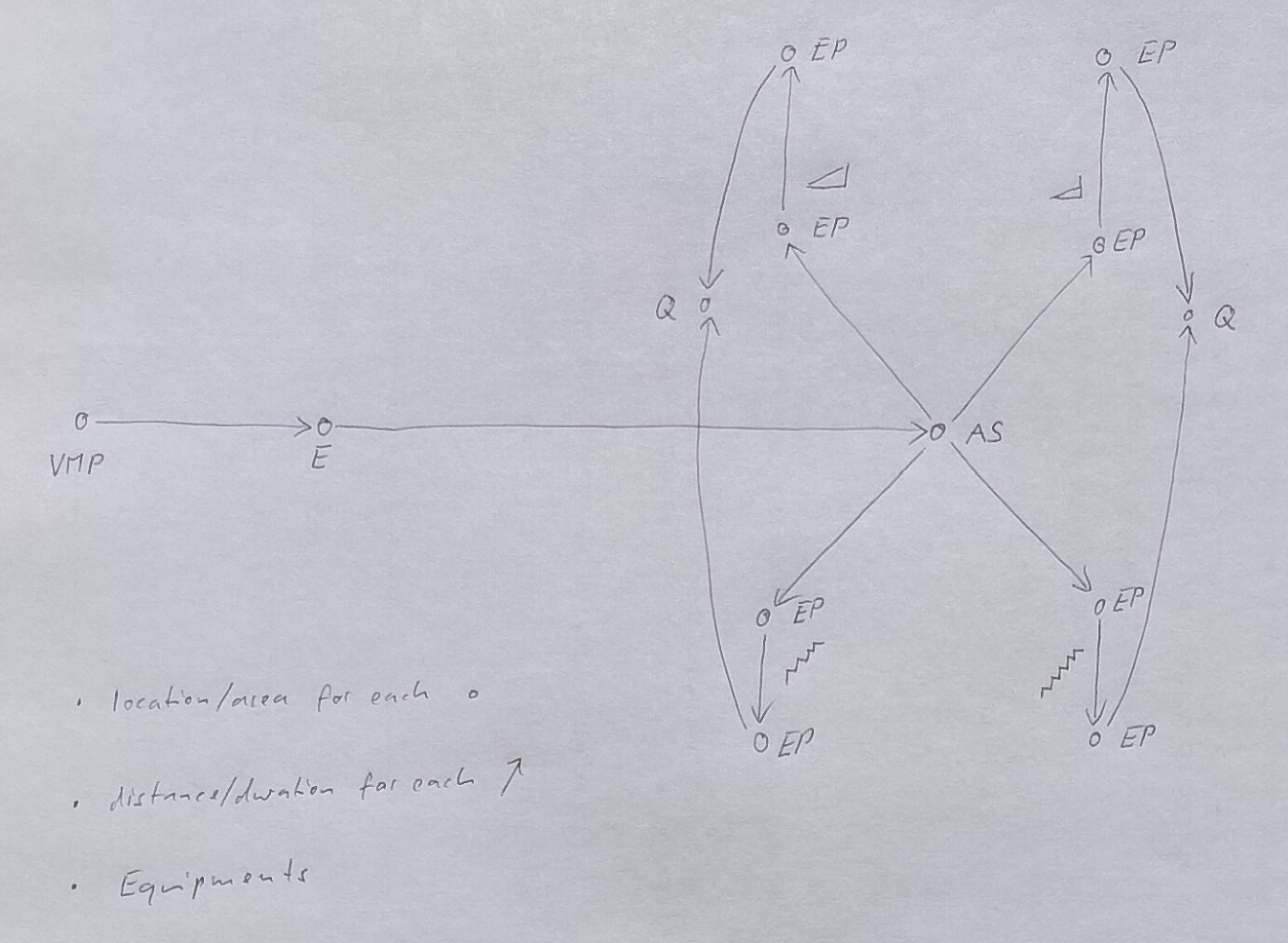
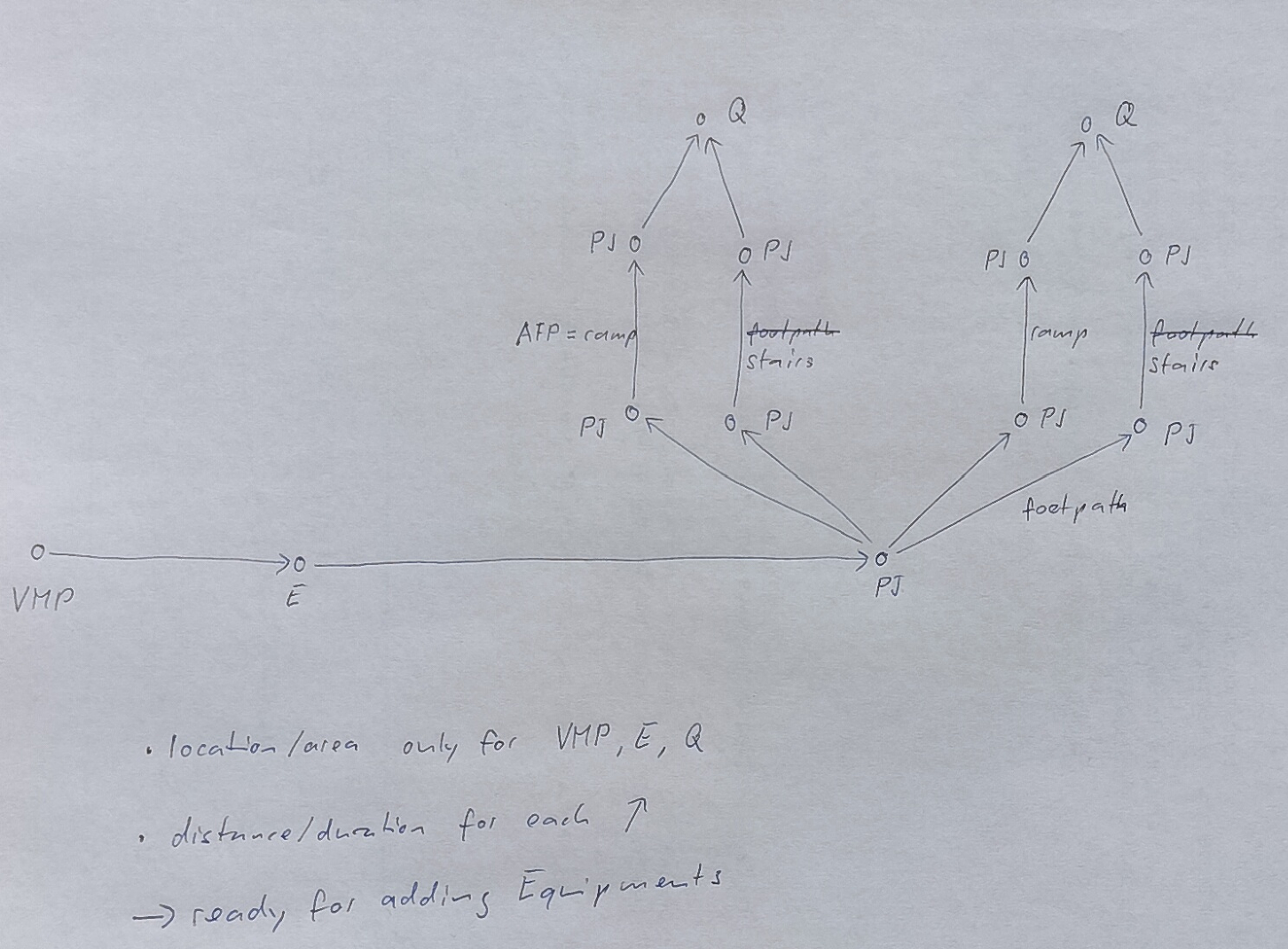
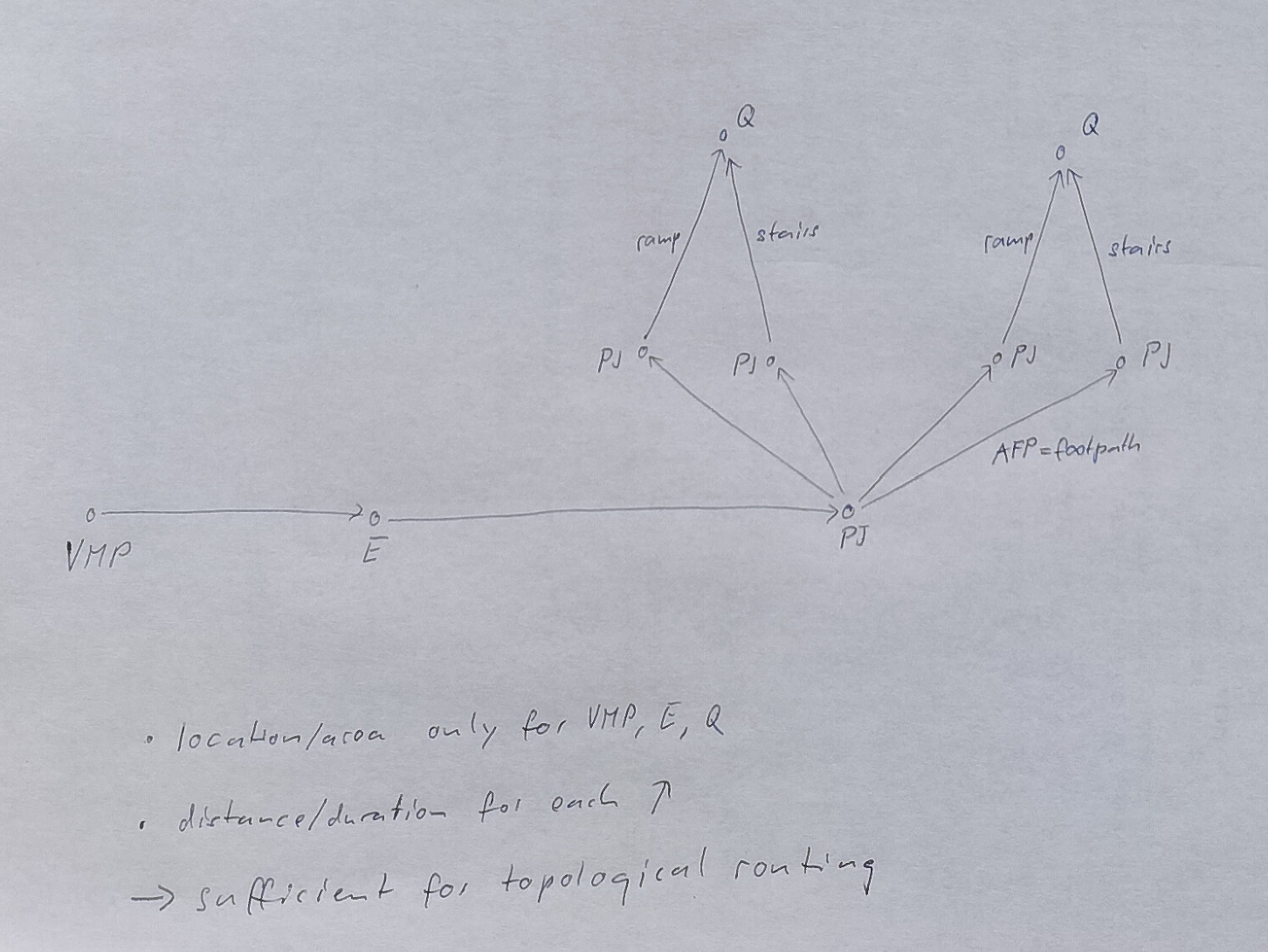
Which conventions and rules do we want to follow when modelling navigation networks? Which level(s) of details should we aim at? The following is intended as a starting point for a discussion.
Three possible ways to model a navigation network from a VehicleMeetingPoint (error: the idea was a drop off point or parking) to two Quays.
The first model includes localised vertices (e.g., Entrance, EquipmentPlace) connected by SitePathLinks and AccessEquipments (StairEquipment, RampEquipment).
VMP = VehicleMeetingPoint, E = Entrance, AS = AccessSpace, EP = EquipmentPlace, Q = Quay, arrow = SitePathLink
The second model uses localised and possibly non-localised (PathJunction) vertices, connected by similar SitePathLinks as the first model, but without Equipments and EquipmentPlaces.
PJ = PathJunction
The third model is a streamlined form that doesn’t insist on PathJunctions if they don’t provide additional information needed for accessibility routing.
TEMPLATES FOR THIS DOCUMENT
NewElementX
→ Glossary definition TODO
Purpose
…
Table
NewElement.md
Example
NewElement.xml
→ Template
ExistingElementY - the Additional Elements
Table
OldElement_withAccessibility.md
Example
OldElement_withAccessibility.xml
→ Template